By Ajita Mishra, Product Manager and Vikram Vaswani, Developer Advocate - Apr 06, 2022
Rev AI's ASR APIs already power speech recognition in thousands of applications and services. But apart from transcription services, Rev AI also enables developers to extract deeper insights from their transcribed data and use these insights in downstream applications
This tutorial introduces Rev AI's Topic Extraction and Sentiment Analysis APIs and explains how to use them to obtain additional speech insights from a transcript.
This tutorial assumes that:
- You have a Rev AI account and access token. If not, sign up for a free account and generate an access token.
- You have a transcript in JSON format. If not, use this example transcript from Rev AI or generate a transcript from an audio file using the Asynchronous Speech-to-Text API.
The following sections provide an overview of the Topic Extraction and Sentiment Analysis APIs and possible use cases.
The Topic Extraction API identifies important keywords and concepts in transcribed speech. It offers developers a fast, automated, and accurate way to retrieve the core topics or subjects in a speech or discussion. The API accepts and analyzes an input transcript and returns a ranked list of topics, together with all the input content fragments relevant to each topic.
Topic extraction enables a variety of applications and use cases, such as:
- Auto-generated agendas for meetings and phone calls
- Automated classification or keyword indexing for digital media libraries
- Automated tagging for Customer Service (CS) complaints or support tickets
The Sentiment Analysis API identifies emotional content in transcribed speech input and attempts to qualify it as positive, negative, or neutral. This API enables developers to obtain qualitative insights based on the feelings expressed in verbal and written communication and build applications to act on those insights. Some examples are:
- Tracking Customer Service (CS) satisfaction levels from customer agent interactions or written complaints
- Analyzing political sentiment based on reactions to public speeches
- Understanding student engagement and attitudes in class
- Scoring leads based on sales team member interactions with prospects
- Understanding witness attitudes in depositions
Topic extraction and sentiment analysis also go well together. For example, let's say you want to know when someone was talking negatively about a public figure, and also want to know exactly what they said. Use ASR to get the transcript, then run topic extraction and sentiment analysis to filter and return the cross-sections that are significant.
The following sections explain how to get started with these APIs.
Submit the transcript to the API as below:
curl -X POST "https://api.rev.ai/topic_extraction/v1/jobs" \
     -H "Authorization: Bearer <REVAI_ACCESS_TOKEN>" \
     -H "Content-Type: application/json" \
     -d '{"json": "<TRANSCRIPT>"}'
Your request must contain an Authorization header containing your API access token and a json parameter with the JSON transcript to be analyzed.
The API response will contain a job identifier (id field). Copy this to your clipboard or note it, as it will be needed for the next step.
Topic extraction jobs usually complete within 10-20 seconds, so wait ~30 seconds and then make a second request to obtain the results, as below.
curl -X GET "https://api.rev.ai/topic_extraction/v1/jobs/<ID>/result" \
     -H "Authorization: Bearer <REVAI_ACCESS_TOKEN>"
Here is an example of the response (formatted and colourized for readability):
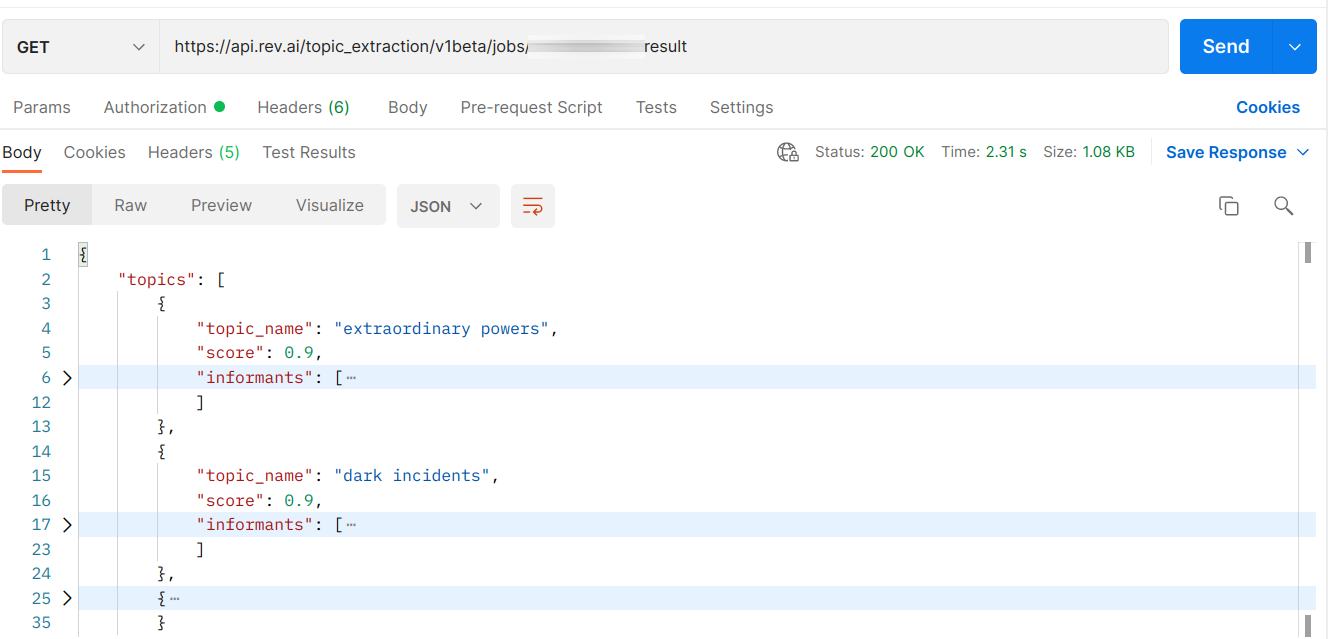
In addition to a list of identified topics, the API also returns a score for each topic (similar to confidence scores). The higher the score, the more likely this is a topic of the input transcript. It’s also possible to filter out topics below a specified score threshold, by adding a threshold query parameter to the request.
Submit the transcript to the API as below.
curl -X POST "https://api.rev.ai/sentiment_analysis/v1/jobs" \
     -H "Authorization: Bearer <REVAI_ACCESS_TOKEN>" \
     -H "Content-Type: application/json" \
     -d '{"json": "<TRANSCRIPT>"}'
Here too, your request must contain an Authorization header containing your API access token and a json parameter with the JSON transcript to be analyzed.
The API response will contain a job identifier (id field). Copy this to your clipboard or note it, as it will be needed for the next step.
Sentiment analysis jobs usually complete within 10-20 seconds, so wait ~30 seconds and then make a second request to obtain the results, as below.
curl -X GET "https://api.rev.ai/sentiment_analysis/v1/jobs/<ID>/result" \
     -H "Authorization: Bearer <REVAI_ACCESS_TOKEN>"
Here is an example of the response (formatted and colorized for readability):
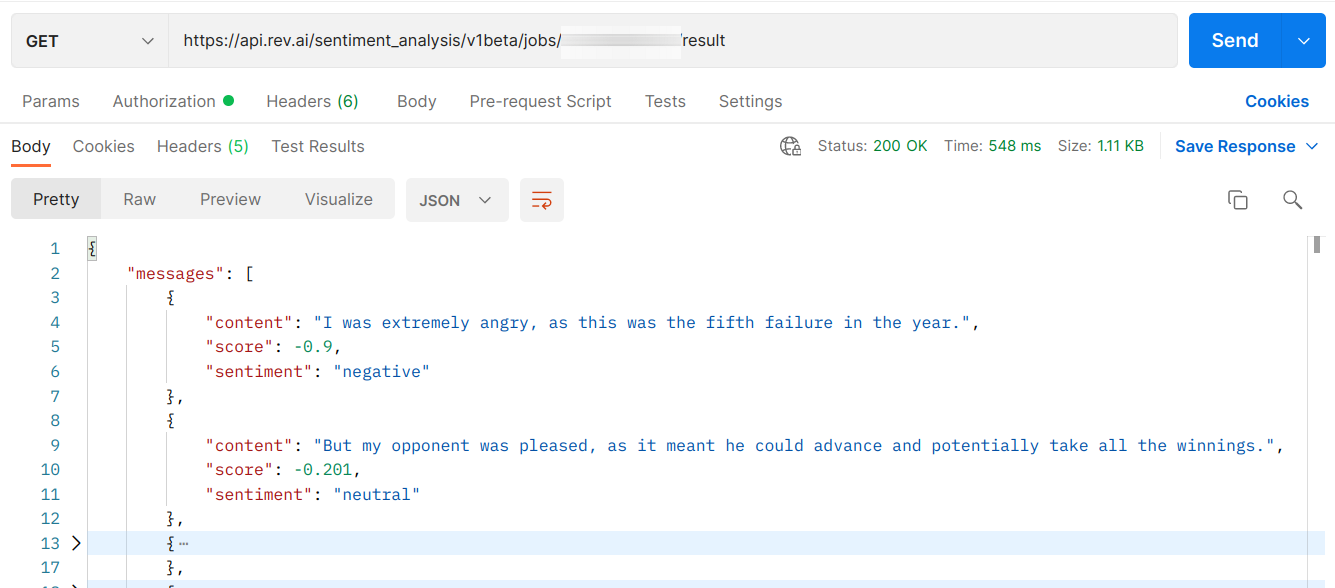
It’s also possible to filter the result set to return only positive, negative, or neutral messages by adding a filter_for query parameter to the request.
The following important points should be noted:
- Both APIs currently only support English language input and work in asynchronous mode.
- Both APIs analyze inputs and return results per sentence — this is intentional to deliver the required granularity and accuracy. However, if you're looking for a document-level result, it’s relatively easy to write program logic to derive a summary sentiment or topic report based on the sentences that comprise that document.
- Both APIs return
4xxand5xxstatus codes in case of errors.4xxerrors indicate an error due to the request provided. For these errors, the HTTP response includes a problem details payload. For a complete list of possible errors, refer to the documentation for each topic extraction and sentiment analysis endpoint.
These new APIs enable developers to enhance their applications by using additional speech insights to deliver greater value and features to their users.
Learn more about these APIs by visiting the following links:
- Documentation: Topic Extraction API
- Documentation: Sentiment Analysis API